
Agent Avatar

HQ / Field Manual & Support

Welcome to the Agent Right Hand database. This manual translates technical operations so you understand exactly how your Digital Assistant operates.

📖 Open 10-Page Visual User Guide & Step-by-Step Demos (Web + PDF) →⚙️ View Deep-Dive Product Architecture & AI Comparison Specs →

Need immediate help or on the fence? Ask the 24/7 Support Agent.

✓ TRAINED ON ALL 10 USER GUIDE PAGES & 18 SCREENSHOTS

Zero Token Cost. 10 questions remaining in this session.

Interface Orientation & Inside-the-Portal Preview

🖥️ Launch Full 18-Screen Interactive Portal Tour →
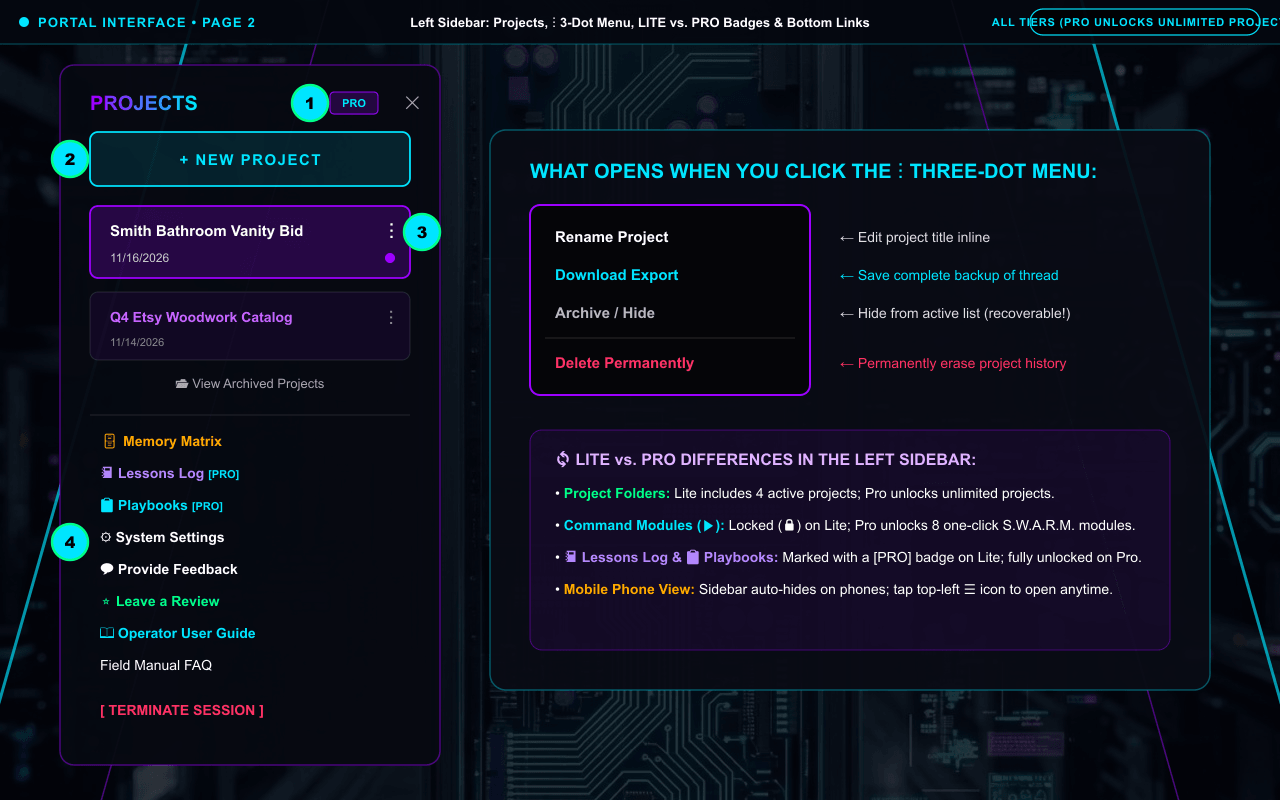
Dashboard & Left Sidebar Project Structure

1. Left Sidebar & Project Folders

Organize all initiatives into separate “Projects” in the left sidebar (with Rename, Export, Archive, and Delete in the ⋮ menu), plus 1-click access to Memory, Playbooks, Lessons, and Settings.
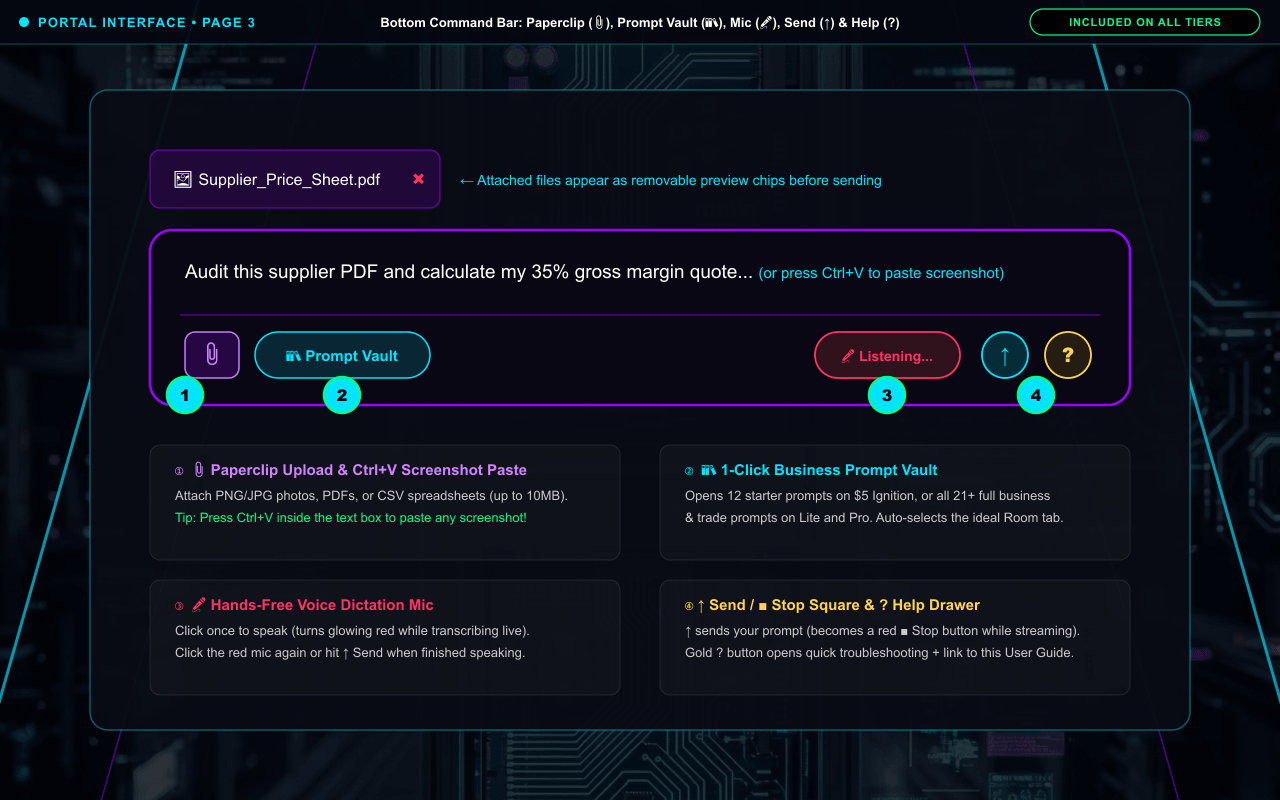
Bottom Command Bar Controls

2. Bottom Command Bar (📎, 📚, 🎤, ?)

Attach photos/CSVs/PDFs or paste screenshots via 📎, insert proven prompts from 📚 Prompt Vault, or dictate hands-free using the 🎤 Voice Microphone.
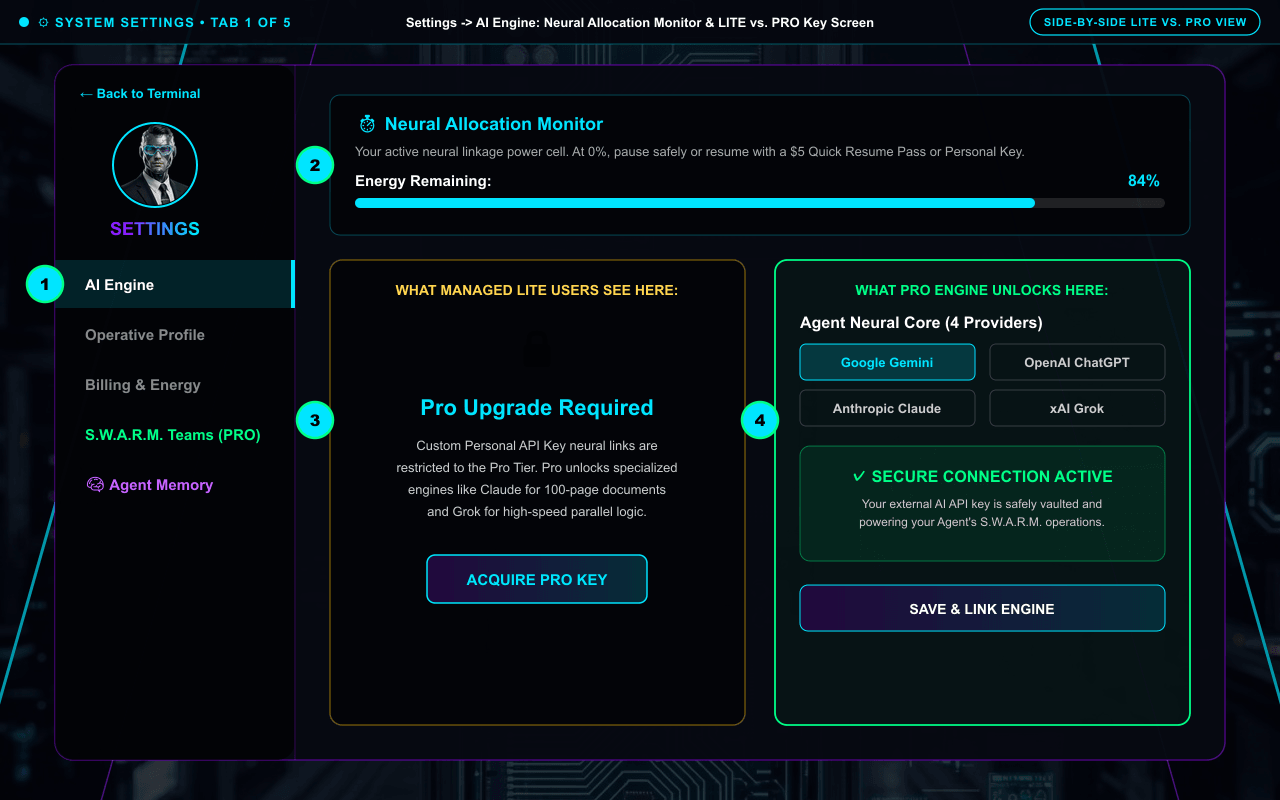
System Settings & Neural Allocation Monitor

3. System Settings & Energy Monitor

Track your remaining Energy Cell percentage, switch between Gemini, ChatGPT, Claude, and Grok, configure S.W.A.R.M. departments, or inspect your Stored Business Context.

Agent Right Hand vs. Standalone AI Chatbots (ChatGPT / Claude)

📸 See Visual Screenshots in User Guide →
Why should I use Agent Right Hand instead of just using ChatGPT or Claude directly (or building my own DIY "Project" folder)?▼
While you can build a basic profile and saved prompts inside a single chatbot Project (just like a contractor can wire up estimating templates in a blank spreadsheet instead of using ready-made shop software), telling a busy small business owner 'just write your own Project instructions' overlooks three real-world problems: **(1) most owners don't know what an AI needs to know** (there is no pre-built `.md` business blueprint waiting in an empty chatbot folder), **(2) standard chatbots default to being agreeable 'yes-men'**, and **(3) DIY setups require ongoing manual maintenance inside one locked provider**. Agent Right Hand solves all of these across ChatGPT, Claude, Gemini, and Grok: 1. **Pre-Built `.md` Operational Blueprints (No Blank-Page Guesswork):** Our established system `.md` protocols, Setup Wizard, and 4 Operating Rooms are already built, so the Agent knows *which* diagnostic questions and financial numbers to ask you from minute one. 2. **Engineered Against the Chatbot 'Yes-Man' Bias:** Consumer chatbots are trained to flatter almost any idea you type, which is dangerous when pricing a job or launching an offer. ARH's system protocols (including our *Humility & Directness Clause*, *Profit Room Margin Shield*, and *The Red Teamer* specialist) push back honestly, flag hidden costs (taxes, insurance, admin time, platform fees), and stress-test weak assumptions before you spend money. 3. **Cross-Model Self-Updating Business Memory:** Even though ChatGPT and Claude have built-in memory and Project files, ChatGPT's memory is locked inside ChatGPT and Claude's is locked inside Claude, while static Project instruction files still require manual updates when your prices or services change. ARH automatically updates one shared Stored Business Context profile in the database as your business evolves and shares it across all 4 AI providers. 4. **Live Server-Side Competitor Web Extraction & 8 S.W.A.R.M. Specialists:** Fetches live competitor websites, coordinates up to 8 specialist roles in parallel, builds custom trade specialists in the HR Forge, and condenses long threads while keeping your core numbers intact.
What is the actual difference between a single LLM and an Agent Operating System?▼
An LLM (Large Language Model) is the underlying AI brain (like Gemini, Claude, OpenAI ChatGPT, or Grok) that answers one prompt at a time. Agent Right Hand is the business memory, coaching, and multi-agent workspace built around those brains. If you say 'Audit my competitor' to a standard chatbot tab, it gives you generic advice. In Agent Right Hand, the S.W.A.R.M. system coordinates a live Web Analyst to read the competitor's website, a Financial Modeler to compare pricing and margins, an Audience Profiler to map buyer psychology, and a Red Teamer to spot weaknesses, then combines their findings into one clear action plan.

The Basics & Capabilities

📸 See Visual Screenshots in User Guide →
What is Agent Right Hand?▼
Think of a normal chatbot as an intern who waits for you to tell them every single step and forgets your business details when you open a new tab. Agent Right Hand is a structured AI business coach and workspace. Once you give the Agent a goal, it uses your saved Stored Business Context to break the problem down into steps, fetch live competitor websites, run profit math, and draft ready-to-review documents, spreadsheets, and checklists in 15 to 45 seconds right inside your workspace.
What is a "Project" and why do I need folders?▼
Your Digital Assistant has a memory. If you talk about a jewelry brand for an hour, it remembers the details. If you suddenly switch to asking for a cake recipe in the same thread, the Agent gets confused. A 'Project' is a clean slate: a sealed-off room where the Agent only focuses on that specific goal. The LITE version offers 4 core operational folders (Brainstorm, Tasks, Data, Profit). The PRO version provides infinite customizable folder generation to store limitless, isolated operational threads.
What are the differences between LITE and PRO?▼
Both LITE and PRO include your editable Stored Business Context profile (so the Agent knows your business, pricing, and goals across sessions), all 4 Operating Rooms, live competitor web analysis, and 24/7 coaching. PRO takes the system to the next level for growing businesses: it unlocks the permanent Pro Knowledge Vault (so the Agent can store and search large PDFs, catalogs, and SOPs uploaded months ago), the Memory Condenser for long threads, unlimited custom Project folders, all 8 S.W.A.R.M. specialist roles, and the Custom Sub-Agent HR Forge.
Can I use different AI models like OpenAI, Anthropic, Gemini, or Grok? Does the new model know what the previous model was doing?▼
Absolutely. Agent Right Hand supports Google Gemini, Anthropic (Claude), OpenAI (ChatGPT), and xAI (Grok) inside one shared workspace. **How Model Access Works (Supplied API Key vs. Personal API Key):** • **Supplied API Key (Managed Plans: $5 Ignition, $15/mo Lite, $39/mo Pro):** Includes built-in **Google Gemini** commercial API processing out of the box with zero API setup required. (You can also optionally link a personal key in `Settings → AI Engine` at any time while keeping your included Gemini balance.) • **Personal API Key ($9/mo Lite, $19/mo Pro):** Connect your own API keys from **Google Gemini, Anthropic (Claude), OpenAI (ChatGPT), or xAI (Grok)** in `Settings → AI Engine` to switch models anytime, or assign different AI models to different S.W.A.R.M. departments in Pro (for example: Claude for Data & Analytics, ChatGPT or Grok for Creative & Copy, and Gemini for Executive synthesis). **Does the new AI know what the previous AI was doing? Yes, 100%!** Because your project conversation, Stored Business Context, and Pro Knowledge Vault are saved inside your shared Agent Right Hand workspace (rather than locked inside a single AI company's tab), switching models mid-project is seamless. If you start a project with Gemini and switch to ChatGPT, Claude, or Grok, the new model immediately reads the current conversation, past replies from previous models, and your saved business profile, so zero context is ever lost!
How does the 4-Step Business Coaching Engine work, and what strategic frameworks are built in?▼
When you ask broad or strategic questions ('How do I start a business?', 'What should I focus on this week?', 'Why am I not keeping enough profit?'), Agent Right Hand activates its 4-Step Coaching Protocol: 1. **ASSESS:** Asks 2 to 3 targeted diagnostic questions to identify your exact business stage (Idea, Launch, Growth, Scale, or Pivot). 2. **DIAGNOSE:** Pinpoints your #1 current bottleneck (Clarity, Revenue, Pricing/Margins, Operations, or Marketing). 3. **PRESCRIBE:** Delivers ONE clear, prioritized next action step (instead of overwhelming you with a generic 20-item list) and explains why it moves the needle. 4. **FOLLOW UP:** Checks in after you complete the step ('How did it go?') and adjusts your plan based on real-world results. **8 Built-In Strategic Frameworks Available On-Demand:** • **Unit Economics Check** ('Does each job or sale make money after all costs, taxes, and admin time?') • **90-Day Sprint Planning** ('What are the 3 highest-leverage priorities this quarter?') • **Business Model Canvas** ('Who pays you, why, and how much?') • **SWOT & Competitor Audit** ('Strengths, weaknesses, opportunities, and live competitor gaps') • **Competitive Moat Analysis** ('What stops a competitor from undercutting you tomorrow?') • **Revenue Model & 3-Tier Pricing Design** (Good-Better-Best packages, retainers, and upsell bundles) • **Go-To-Market Launch Sequence** (Target buyer profile, channel selection, and first-customer outreach) • **Financial Health & Margin Shield Check** (Gross vs. net margin, overhead leaks, and break-even math)

What ARH Can & Can't Do

📸 See Visual Screenshots in User Guide →
What can Agent Right Hand actually do for my business?▼
Agent Right Hand is built for strategic intelligence, content creation, and business coaching. Here's a quick breakdown of its core strengths: ✅ STRATEGY & COACHING: Business planning, competitive analysis, SWOT audits, 90-day sprint planning, pricing strategy, and one-on-one mentoring sessions. ✅ CONTENT CREATION: Write blog posts, email campaigns, social media content, product descriptions, SOPs, checklists, and full marketing playbooks. ✅ SEO & LISTINGS: Generate optimized titles, descriptions, and tags for Etsy, Amazon, Shopify, or any e-commerce platform. ✅ FINANCIAL MODELING: Unit economics, margin calculations, ROI analysis, break-even modeling, and pricing experiments. ✅ WEB RESEARCH: Deploy the Web Analyst to scrape and analyze any public website, competitor page, or industry resource. ✅ FILE ANALYSIS: Upload CSVs, PDFs, images, or text files using the paperclip button, and the Agent reads and analyzes them instantly. ✅ DOCUMENT GENERATION: Create downloadable HTML files (checklists, reports, guides) with professional formatting. ✅ MULTI-MODEL AI: Switch between Google Gemini, OpenAI, Anthropic Claude, or xAI Grok to find the best brain for each task.
What can't ARH do? Why does it have limitations?▼
Great question, and we believe in being upfront about this. Think of how a real human business coach works: a business coach doesn't drive to your office or workshop to answer your phone calls, take product photos, send emails from your personal inbox, or log into your Etsy store behind your back. You remain the owner in charge of your physical business operations. Similarly, Agent Right Hand runs inside your web browser with zero local software installation, keeping your local computer and third-party credentials protected. Because of this design, there are certain physical or third-party tasks ARH does not perform directly: ❌ CANNOT access files on your computer unless you upload them via the paperclip button. ❌ CANNOT batch-process large numbers of images (e.g., resizing 100 photos at once) or shoot/render video and photo assets. ❌ CANNOT run code or scripts directly on your local machine. ❌ CANNOT directly log into or edit your Etsy, Shopify, or Amazon store, though it CAN generate optimized content and bulk CSV files for you to review and import. ❌ CANNOT post to social media or send emails from your inbox on your behalf, though it CAN draft all the content and create a complete schedule. ❌ CANNOT generate native PDF binaries, though it CAN create formatted HTML documents that convert to PDF with one click (CTRL+P → Save as PDF). Think of it this way: ARH is your business coach, strategist, analyst, and writer. It prepares the strategy, numbers, copy, and master prompts so you stay in 100% control of executing in your business.
Can I upload files for ARH to analyze, and what is stored temporarily vs. permanently?▼
Yes! Click the paperclip icon (📎) next to the text input field to attach files directly into your conversation: • Images: PNG, JPG, WEBP, GIF (up to 10MB) • Documents: PDF files, plain text files • Data: CSV spreadsheets **How Data Storage Works (Temporary Attachments vs. Permanent Editable Memory):** 1. **Session Paperclip Attachments (Temporary):** When you attach a file with the paperclip icon (such as a 500-row Etsy or Shopify CSV spreadsheet to optimize, or an invoice PDF), ARH reads and processes that file for your current conversation without permanently storing your raw customer spreadsheets on disk. 2. **Permanent Business Knowledge (Editable Anytime):** Details you want the Agent to remember across all sessions are saved in your private cloud account in three ways: your **Setup Wizard profile**, your **User-Editable Stored Business Context** (where you can type `"show my profile"` or `"fix my profile"` in chat, or open Settings → 🧠 Agent Memory to read and edit your saved business facts anytime), and, in the **PRO Engine**, your **Private Pro Knowledge Vault** and **Memory Condenser** for long-term catalogs, SOPs, and Executive Briefs.
What if I need help with something ARH can't do directly (like video or image generation)?▼
Just like a real human employee or business coach, no single tool (and no standalone chatbot) can do 100% of everything in a business. Instead of just saying 'I can't do that,' ARH acts like a resourceful manager and **Master Prompt Architect**: 1. It completes every part of the job it CAN handle (strategy, scripts, copy, financial math, checklists). 2. Because ARH already holds your saved business profile, brand voice, customer details, and product specs in memory, **it writes the exact, ready-to-paste master prompt** for you to drop into a 3rd-party image generator, video generator, or specialty tool. 3. It recommends the right external tool for the job and walks you through using it step by step. For example: • Need promotional videos or AI product photos? → ARH writes the storyboard and builds the exact, brand-tailored prompt for you to paste into your preferred video or image generator. • Need images batch-resized? → ARH recommends Birme.net (free, browser-based) or writes you a simple script. • Need a website built? → ARH plans the layout, writes the code, and walks you through launching it. • Need social media posted? → ARH drafts the posts and helps you schedule them.
Can ARH edit my Etsy, Amazon, or Shopify listings directly?▼
ARH cannot log into third-party platforms or make changes on your behalf. These platforms require authenticated browser sessions with your personal credentials, which ARH does not and should not have access to. However, ARH CAN do the heavy lifting: 1. Upload your listing data (CSV export) using the paperclip button. 2. ARH analyzes every listing and generates optimized titles, descriptions, and SEO tags. 3. ARH outputs a clean CSV file that you can download and re-import directly into your platform's bulk editor. This workflow can save you dozens of hours compared to manually rewriting each listing. Most e-commerce platforms (Etsy, Shopify, Amazon) support CSV bulk import for exactly this purpose.
Will ARH ever be able to do more advanced tasks like batch image processing or local file access?▼
We are actively watching the AI landscape evolve. Technologies like desktop AI agents and local companion apps are emerging rapidly. Here is our honest roadmap: NEAR-TERM (Buildable Now): • Upload a file → ARH processes it → Download the result (e.g., CSV optimization) • Enhanced file analysis for images, PDFs, and spreadsheets MEDIUM-TERM (Exploring): • A lightweight companion tool that runs on your computer and connects to your ARH dashboard for local file operations • Client-side image processing directly in the browser for simple tasks LONG-TERM (Industry-Dependent): • Full desktop agent capabilities as browser security standards and AI tooling mature We believe in being transparent about what the platform can do TODAY rather than selling promises about tomorrow. Every feature listed on our pricing page works right now.

Pricing, Licenses, & Monthly Retainers

📸 See Visual Screenshots in User Guide →
What is the "Supplied API Key" option? How much monthly AI compute is included, and what if I need a top-off?▼
When you purchase the Supplied API Key plan (Lite or Pro), you purchase your Software License & Instant Activation up front. This includes your private agent connection, encrypted knowledge database, and your entire first month of agent assistance! After the first month, it seamlessly continues on a flat-rate, cancel-anytime monthly retainer ($15/mo Lite / $39/mo Pro) with built-in Google Gemini commercial AI compute included out of the box that automatically reloads every billing cycle: • **ARH Ignition Test Drive ($5 one-time):** Up to **50+ strategy sessions (~500,000 words)** on **Google Gemini 2.5 Flash**. • **ARH Lite Core ($49 upfront, then $15/mo):** Up to **150+ monthly coaching, estimating & task sessions (~1.5 million words/mo)** on **Google Gemini 2.5 Flash** (plenty for daily quotes, emails, and checklists all month). • **ARH Pro Engine ($149 upfront, then $39/mo):** Up to **400+ monthly sessions & multi-agent S.W.A.R.M. runs (~4 million words/mo)** pairing **Google Gemini 2.5 Flash** with **Google Gemini 3.1 Pro** for deep S.W.A.R.M. specialist delegations. **What if I have a heavy month and use up my monthly tokens early?** Normal daily business coaching, estimating, and tasks are covered by your monthly allowance. If you ever run an unusually heavy month (such as dozens of bulk catalog audits) and use up your monthly allowance before your renewal date, you can optionally grab a **$5 Quick Resume Pass** (a one-time reserve boost) at any time, or simply wait for your monthly billing cycle to reload automatically.
What is the "Personal API Key" option? How does it differ from Supplied Key?▼
The Personal API Key option lets you connect your own API key from **Google Gemini, Anthropic (Claude), OpenAI (ChatGPT), or xAI (Grok)** in `Settings → AI Engine` using our 60-second step-by-step setup links (no coding required). You pay a lower upfront software license ($29 Lite / $99 Pro) which includes instant activation, private agent connection, and your 1st month of platform access, followed by a modest monthly platform retainer ($9/mo Lite / $19/mo Pro), while your AI token usage is billed directly by your chosen provider account (Google, Anthropic, OpenAI, or xAI).
If I start with a Personal Key, can I change to a Supplied Key Subscription later?▼
Yes! If you prefer not to manage individual AI provider billings, you can subscribe to our Supplied API Key Monthly Retainer plan on Whop to switch to a fully managed routing experience at any time.
How do I update or change my Personal API Key, and where do I get one?▼
To add or update your Personal API Key at any time, click the 'Settings' gear icon in the bottom-left of your dashboard and open the 'AI Engine' tab. Select your preferred provider, paste your key, and click 'Save & Link Engine' (or click '[ Update / Change API Key ]' if you are replacing an existing key). **Direct Official Provider Links to Create an API Key:** • **Google Gemini:** https://aistudio.google.com/app/apikey • **OpenAI (ChatGPT):** https://platform.openai.com/api-keys • **Anthropic (Claude):** https://console.anthropic.com/settings/keys • **xAI (Grok):** https://console.x.ai
Can I cancel my subscription at any time? How does cancellation work?▼
Yes, absolutely! There are zero long-term contracts, cancellation fees, or lock-in periods. You can cancel your recurring monthly subscription at any time with a single click in your Whop Billing Portal (whop.com/hub) or directly from the link in your email receipts. You will retain full access to your workspace and agent through the end of your current paid billing cycle.
What happens to my data and projects if I cancel or pause my subscription? Can I archive or permanently delete my projects and data?▼
We never penalize you by auto-deleting your work just because you pause or cancel your subscription: if you take a break and come back later, your projects, chat histories, custom sub-agents, and saved memory will still be waiting for you. At the same time, **you are always in 100% control of deleting or archiving your data whenever you want**: • **Archive, Restore, or Permanently Delete Any Project:** Click the three dots (`...`) next to any project in your sidebar to **Archive** it (hiding it from your active sidebar while keeping it safe to restore later) or **Permanently Delete** that project and its chat thread. • **Edit or Clear Your Business Profile:** Open **Settings → 🧠 Agent Memory** (or type `"fix my profile"` in chat) to edit or remove any saved detail in your Stored Business Context. • **Full Account & Database Wipe:** If you ever want to erase everything permanently, open **Settings → Danger Zone** to wipe your entire account, saved memory vault, and chat history with one click.
How does the $5 Ignition Test Drive work?▼
The Ignition Pass is an introductory test drive. For a one-time $5, you gain zero-commitment access to experience our executive assistant in action with up to 50+ deep strategy sessions (~500,000 words of processing on Google Gemini 2.5 Flash). Once your allocation is fulfilled, your session pauses seamlessly and you can upgrade to Lite or Pro anytime without losing any of your chat history or notes!
What is your Refund Policy, and how do I reach a human if I need account or technical help?▼
**1. Try Before You Commit ($5 Ignition Test Drive):** We built the **$5 Ignition Test Drive** (50+ sessions / ~500,000 words with no recurring monthly bill) specifically so you can test Agent Right Hand on your real business numbers before purchasing a $49 Lite or $149 Pro software license. **2. Refund & Billing Resolution Policy (via Whop):** • **Recurring Monthly Retainers ($15/mo or $39/mo):** Cancel anytime with 1 click in your **Whop Billing Hub (https://whop.com/hub)** before your next billing date with zero cancellation penalties. • **Upfront Software Licenses & AI Compute:** Because activating a license immediately provisions your cloud workspace and bundled monthly AI compute allowance, consumed AI compute is non-refundable. However, if you experience a duplicate charge, billing error, or technical activation failure, you can submit a refund or billing resolution request 24/7 through **Whop's Customer Resolution Center (https://whop.com/hub)** or via our Human Engineering Support Ticket form below. **3. How to Reach Human Engineering Support (Technology by WBMB Inc.):** If our 24/7 AI Support Agent on this page cannot resolve your question, scroll to the **Request Human Engineering Support Ticket** form at the bottom of this page (or click **Provide System Feedback** inside your portal sidebar), enter your email address and issue, and our human engineering team at **Technology by WBMB Inc.** will receive an instant alert and follow up with you directly by email (typically within 1 business day).

Interface & Setup Wizard

📸 See Visual Screenshots in User Guide →
I just bought it! What is the Setup Wizard, and can I edit what the Agent remembers about my business later?▼
When you log into Agent Right Hand for the very first time, you are greeted by the 'Setup Wizard' gateway. This onboarding flow captures your core business metrics, niche, pricing levers, and operational goals so the Agent's baseline DNA is calibrated to your exact industry from day one, whether you run a local handyman service, an Etsy shop, a retail store, or a consulting agency (and if you run multiple distinct service lines under one business, it keeps them organized separately!). Even better: as you chat with Agent Right Hand, it automatically detects new facts about your business (pricing, tools, tone preferences, and key decisions), saves them into your **Stored Business Context** profile, and briefly notifies you whenever it saves a new detail. At any time, you can simply type **"show my profile"** or **"fix my profile"** directly in chat, OR open **Settings → 🧠 Agent Memory** to inspect, double-check, and manually edit (`✎ Edit`) that file whenever you want!
What are the 4 Operating Rooms (Brainstorm, Tasks, Data, Profit)?▼
To make it easier for you to stay organized and prevent the Agent from getting confused by mixed contexts, each project gives you 4 dedicated Operating Rooms: 1. **BRAINSTORM:** Use this when you want to think out loud, map strategy, or get 24/7 business coaching. 2. **TASKS:** Use this when you need finished deliverables (checklists, SOPs, emails, or bulk product listings). 3. **DATA:** Drop URLs or paste raw notes here to save them into your business memory. 4. **PROFIT (Job-Estimating & Margin Shield Room):** The dedicated financial and estimating room. It distinguishes **Markup vs. Gross Margin** (for example: a 30% markup on a $100 cost is $130, which is only a 23.08% gross margin, whereas a 30% gross margin requires $142.86), accounts for on-site labor, unpaid travel/prep time, materials, subcontractor costs, disposal fees, overhead, contingency, and tax set-asides, shows every input and calculation step explicitly, and generates **3-Tier (Good / Better / Best) Customer Quotes**. *(And if you ever forget to switch tabs and ask a pricing question inside Brainstorm or Tasks, your Agent's financial guardrails still kick in automatically!)*
What is the "Memory Condenser" button?▼
As your project grows longer, the AI has to read the entire chat history over and over every time you ask a question. This slows down the Agent, uses up your API tokens rapidly, and can cause the Agent to get confused. The Memory Condenser is an ultra-efficient PRO-exclusive tool that takes your old, dense messages, safely vaults them into an archive out of sight, and seamlessly condenses the entire history into a single masterful Executive Brief. This clears the clutter, instantly accelerates the Agent's thought processes, and allows for infinite project lifespans with zero speed penalties.
What do the Microphone and Paperclip buttons do?▼
The Paperclip allows you to securely attach files directly to your message so the Agent can analyze them. The Microphone activates your browser's native speech-to-text! Click the mic once to turn it ON (it will glow red). Talk as much as you want, and your words will instantly type into the text box. **How do I finish recording?** Whenever you are done, you can either click the glowing Microphone again to stop listening, OR you can simply hit the physical [SEND] button if you are satisfied!
Can the Agent speak its answers out loud to me, and how do I troubleshoot Voice or Microphone settings?▼
Yes! Both voice input (`🎤` Speech-to-Text Dictation on all plans) and spoken audio output (`🔊 PLAY AUDIO` Text-to-Speech on Pro) are built directly into the portal on mobile and desktop browsers: • **Enabling Spoken Audio Output (`🔊`):** Open **Settings → Operative Profile**, toggle **Voice Interface Active** to ON, select your preferred Voice Profile from the dropdown, and click the **TEST** button to hear a preview. A `[ 🔊 PLAY AUDIO ]` button will appear below every Agent reply (`[ ⏹ STOP AUDIO ]` stops playback anytime). • **Quick Microphone & Audio Troubleshooting:** If the microphone doesn't activate, click the Lock/Permissions icon in your browser's address bar and set Microphone to **Allow**, then refresh. If audio doesn't play on mobile, make sure your phone isn't on silent mode and that your browser tab is unmuted.
What are the "Lessons Learned Log" (📓) and "Custom SOP Playbooks" (📋) inside the portal sidebar?▼
Beyond your Stored Business Context profile and 4 Operating Rooms, the portal sidebar includes two compounding business intelligence tools: 1. **📓 Lessons Learned Log:** After completing major tasks or audits, Agent Right Hand automatically captures and categorizes key business takeaways (`♟️ Strategy`, `📊 Market Insight`, `🎯 Competitor`, `⚙️ Process`, and `⚠️ Mistake`) into your **Lessons Learned Log**. These insights compound over time so the Agent remembers what worked and helps you avoid repeating past business mistakes. You can filter, review, copy, or delete any logged lesson at any time. 2. **📋 Custom SOP Playbooks Library & Editor:** Pre-loaded with 4 multi-step starter Playbooks (*Website CRO Audit*, *Competitor Audit*, *90-Day Business Sprint*, and *Etsy/Amazon Product Launch*), the Playbooks modal also includes a visual **Playbook Editor** where you can build, edit, pin, and activate your own custom reusable Standard Operating Procedures across `📢 Marketing`, `💰 Sales`, `⚙️ Operations`, and `📊 Finance`.
How do I export my data, chat logs, business profile, or custom playbooks?▼
We believe in full data portability so your work is never trapped: • **Per-Project `.CSV` Spreadsheet Export:** Click the **DOWNLOAD AS .CSV** button at the bottom of any chat feed to download that project's full conversation history as a clean spreadsheet. • **Full-Account `.JSON` Data Export:** Open **Settings → Operative Profile** to download all of your chat logs and workspace data as a `.JSON` archive. • **Plain-Text Business Profile, Playbooks & Custom Specialists:** Your **Stored Business Context** (`Settings → 🧠 Agent Memory` or type `"show my profile"`), **SOP Playbooks** (`📋 Playbooks`), **Lessons Learned Log** (`📓 Lessons Log`), and **Custom Sub-Agent prompts** are all stored in plain, human-readable text inside your dashboard so you can inspect or copy them into any external tool anytime.

Pro Command Modules

📸 See Visual Screenshots in User Guide →
What does S.W.A.R.M. stand for?▼
S.W.A.R.M. stands for Simultaneous Workflow & Autonomous Reasoning Matrix. This is our proprietary flagship protocol available in the Pro version. Instead of talking back and forth with a single AI, deploying a S.W.A.R.M. Command Module splits a complex task into multiple, simultaneous assignments executed by highly specialized sub-agents (like an Analyst, a Red Teamer, and a Coder) all working on your exact same problem in parallel before fusing their answers.
Who are the 8 Elite S.W.A.R.M. Sub-Agents, and what are the 5 One-Click Command Modules & Custom HR Forge?▼
Your Agent Right Hand (The Boss) coordinates 8 specialized sub-agents across 3 departments: **The Web Analyst**, **The Financial Modeler**, **The Audience Profiler**, **The Red Teamer**, **The Operations Chief**, **The Creative Director**, **The Scribe**, and **The Code Architect**. In addition to automatic delegation in chat, the Pro sidebar includes: • **5 One-Click Command Modules:** Pre-built multi-agent launchpads for **🎯 Affiliate Scout** (partner program discovery), **⚡ Creative Ad Swarm** (Creative Director + 5-angle copy synthesis), **⚡ SEO Content Pipeline** (structured content drafting), **⚡ Lead Enrichment Matrix** (cold-outreach customization), and **⚡ Live Buy-Box Shield** (Amazon/e-commerce listing & hijacker monitoring). • **Custom Sub-Agent HR Forge:** Tell the Boss Agent to build and permanently save a new custom specialist tailored to your exact trade (such as a *Residential Bid Estimator*, *Local Service Quote Checker*, or *Etsy Tag Auditor*).
What is the Smart Website Estimator, and how do I embed it on my website or share it on social media?▼
The **Smart Website Estimator** (accessible via `🔨 Smart Website Estimator` in the sidebar or directly at `https://agentrighthand.app/portal/estimator`) is an embeddable website quoting and lead intelligence engine designed for any business across any industry. • **How It Works:** Website visitors pick their services or punch list, see an instant preliminary estimate based on your custom pricing rules (straight hourly, tiered half-day/full-day caps, or fixed packages), upload project photos, and submit their contact info. • **Hybrid Pricing:** You can configure tasks as hourly labor OR as fixed flat-fee services (like a $95 sprinkler blowout or $65 furnace filter change) within the same quote. • **1-Click Website Embed:** Inside the studio, copy the 1-line `<iframe>` snippet and paste it into WordPress, Wix, Squarespace, Shopify, or Webflow. • **Standalone Link & Instant Print QR Code:** If you don't have a website (or want to run ads on Facebook Marketplace, Nextdoor, or your Google Business Profile), you get a direct hosted link (`/plugin/estimator?tenant=<slug>`) that links back to your official website, plus a live downloadable print-ready QR code for your truck magnets, yard signs, and business cards! • **Leads Inbox & Instant Alerts:** Incoming quote requests land in your private Leads Inbox with customer phone, email, notes, and photos, and instantly trigger an email notification to you with 1-tap call and text buttons.
How do I control which AI model powers my Sub-Agents?▼
In the Settings Menu, under 'S.W.A.R.M. Teams', we have organized the 8 Sub-Agents into 3 Corporate Departments: Executive, Data & Analytics, and Creative & Copy. You can tell the system that you want Anthropic Claude handling your logic (Data team), but you want OpenAI ChatGPT writing your emails (Creative team). The Boss AI will automatically route your tasks to the exact API you prefer!
Why do S.W.A.R.M commands use so much Energy / API Tokens?▼
Instead of asking one AI to write a blog post (which is a single token transaction), a S.W.A.R.M. command might spawn 4 background agents simultaneously. First, the Web Analyst scrapes a URL. Then, the Red Teamer looks for structural flaws. Finally, the Scribe writes the post based on those dual reports. Because multiple AI brains are communicating with each other behind the scenes, it burns through computer processing power (and your Token Battery) much faster than standard chatting. This is why linking your own Personal API Key is highly recommended for agency-level, daily usage!

Billing & Token Exhaustion

📸 See Visual Screenshots in User Guide →
What is the "Energy Remaining" power cell and what happens when it reaches 0%?▼
To protect the system from infinite loop burnouts, your Agent operates on a specialized token allowance. Broadly speaking, asking complex questions or having the Agent draft massive documents costs energy. If you exhaust your subscription allowance for the cycle, the Agent will safely pause until your next recharge cycle, or you can immediately unpause and keep working at any time by purchasing a $5 Quick Resume Pass (an instant reserve boost to get you through the month) or by linking your own Personal API Key in Settings.
My Energy Cell is empty! Can I switch to a Personal API Key or use a Quick Resume Pass?▼
YES. If you reach your monthly managed allocation, you can either grab a $5 Quick Resume Pass to immediately unpause your session, OR link your own Personal API Key in the Settings menu (from Google Gemini, Anthropic, or OpenAI) so your ongoing AI usage runs directly through your own provider account.

Service Level Troubleshooting & Cloud Architecture

📸 See Visual Screenshots in User Guide →
How do cloud storage and browser sessions work if my computer goes to sleep?▼
Your Business Profile, Projects, Setup Wizard settings, and Pro Knowledge Vault live 24/7 in the cloud, so your memory and work are always safe and ready from any computer or phone browser. When you ask a question or run a S.W.A.R.M. competitor audit, the work typically finishes in 15 to 45 seconds right inside your open browser window. Because Agent Right Hand keeps you in control (and prevents runaway background tasks from burning through your tokens while you are away), live responses pause when you close your tab and pick right back up when you open your dashboard.
How do I completely delete my Account and Database?▼
You own 100% of your data. You can export any project conversation at any time using the 'DOWNLOAD AS .CSV' button. And if you ever want to permanently erase your account, open the Settings gear menu and go to the 'Danger Zone' to wipe your account. That immediately and permanently deletes your saved knowledge vault, chat histories, and profile.
How do Billing Support, Account/Password Recovery, and 2-Tier Technical Support (AI + Human Supervisor Escalation) work?▼
Agent Right Hand uses a structured **2-Tier Support Escalation Model** so routine questions are solved in seconds while complex issues escalate cleanly to human engineering: • **Tier 1 (Instant 24/7 Frontline Self-Service & AI Support):** 1. **Billing, Receipts, Refunds & 1-Click Cancellations (Whop Billing Hub):** Managed 24/7 through **Whop's Customer Billing Hub (https://whop.com/hub)**, backed by Whop's dedicated billing and buyer resolution team. 2. **Account Login & Automated Password Recovery (/portal):** Instant automated password reset emails are built directly into the **Portal Login page (/portal)**. 3. **24/7 AI Support Agent:** Our interactive **AI Support Agent** at the top of this `/faq` page is trained on every platform feature to answer setup, room, and workflow questions immediately at zero token cost. • **Tier 2 (Supervisor Escalation — Human Engineering Support Ticket):** If Tier 1 cannot resolve an account, activation, or technical issue, scroll to the **Request Human Engineering Support Ticket** form at the bottom of this `/faq` page (or click **Provide System Feedback** inside the portal sidebar). Entering your email address logs a priority ticket and alerts our human engineering team at **Technology by WBMB Inc.** for direct email follow-up (typically within 1 business day).

Managing Your Projects

📸 See Visual Screenshots in User Guide →
What do the three dots (...) next to my Project do?▼
Clicking the three dots (...) next to any Project in the sidebar opens your Project Management menu. From here, you can Rename, Archive, or permanently Delete the active thread.
How do I Archive a project? Why not just Delete it?▼
Archiving a project removes it from your main active sidebar, reducing visual clutter. However, an Archived project is still safely stored in the database! You can recall and restore an archived project later if you need to retrieve legacy intelligence. Deleting a project, on the other hand, permanently wipes its entire chat history from existence.
Can I rename a project later?▼
Yes. Click the three dots (...) next to the project in the sidebar and select 'Rename'. This helps you tag and accurately index long-term strategy threads for easy retrieval.

Plain English Glossary

LLM (Large Language Model)The brain. The core neural network (like Google Gemini or Claude) that reads your text and writes answers.
Context WindowThe AI's short-term memory limit. If your chat gets longer than the "Context Window," the AI starts forgetting the very first things you said.
Pro Knowledge Vault & Stored Business ContextYour self-updating Business Profile (included on all plans) plus the Pro Knowledge Vault where the AI searches through your private cloud filing cabinet of past uploads, catalogs, and SOPs without you having to re-upload files.
Digital Assistant / AgentUnlike a normal chatbot, an Agent is designed to think step-by-step and execute connected business tasks using built-in tools to assist you.

24/7 Support & Resolution Directory

Agent Right Hand (a product of Technology by WBMB Inc.) uses dedicated 24/7 partner and automated support channels so you get immediate resolution without waiting on hold.

Password ResetGo to the Portal Login Page and click Forgot Password? below the login button. A reset link will be sent to the email you registered with.
Billing, Refunds & SubscriptionsAll purchases are processed through Whop. Log into your Whop customer portal to manage subscriptions, request refunds, update payment methods, or download receipts.
Personal API Key ErrorsCheck your provider directly: Google AI Studio, OpenAI, Anthropic, or xAI (Grok).
Browser & Display IssuesTry clearing your browser cache, disabling extensions, or switching to Chrome or Edge. Your Agent in the dashboard can also troubleshoot basic browser issues.
Lost Email Access?If you lost access to your registration email, recover it through your email provider (Gmail, Outlook, etc.) first. Accounts are tied to verified email addresses for security.
24/7 AI Support & Engineering FeedbackUse the AI Support Agent at the top of this page for immediate answers, click Provide Feedback inside the portal sidebar, or submit a Human Support Ticket below for direct email follow-up.
Direct Human Escalation • Technology by WBMB Inc.

🙋 Request Human Engineering Follow-Up (Submit Support Ticket)

Need human help with an account issue, activation, or technical question that the 24/7 AI Support Agent couldn't solve? Submit a direct ticket below. Your request is logged directly to our engineering database and alerts our human support team for email follow-up (typically within 1 business day).